
A dull or damaged saw blade doesn’t just cut poorly — it’s a safety risk, it wastes material, and it forces your machine to work harder than it should. Yet many operators push blades far past their useful life, either because they don’t recognize the warning signs or because they want to squeeze “just a few more cuts” out of a blade.
After 30+ years of manufacturing TCT saw blades and hearing feedback from customers across Southeast and South Asia, we’ve identified the five clearest signs that a blade needs replacing. Recognizing these early protects your equipment, your product quality, and your operators.
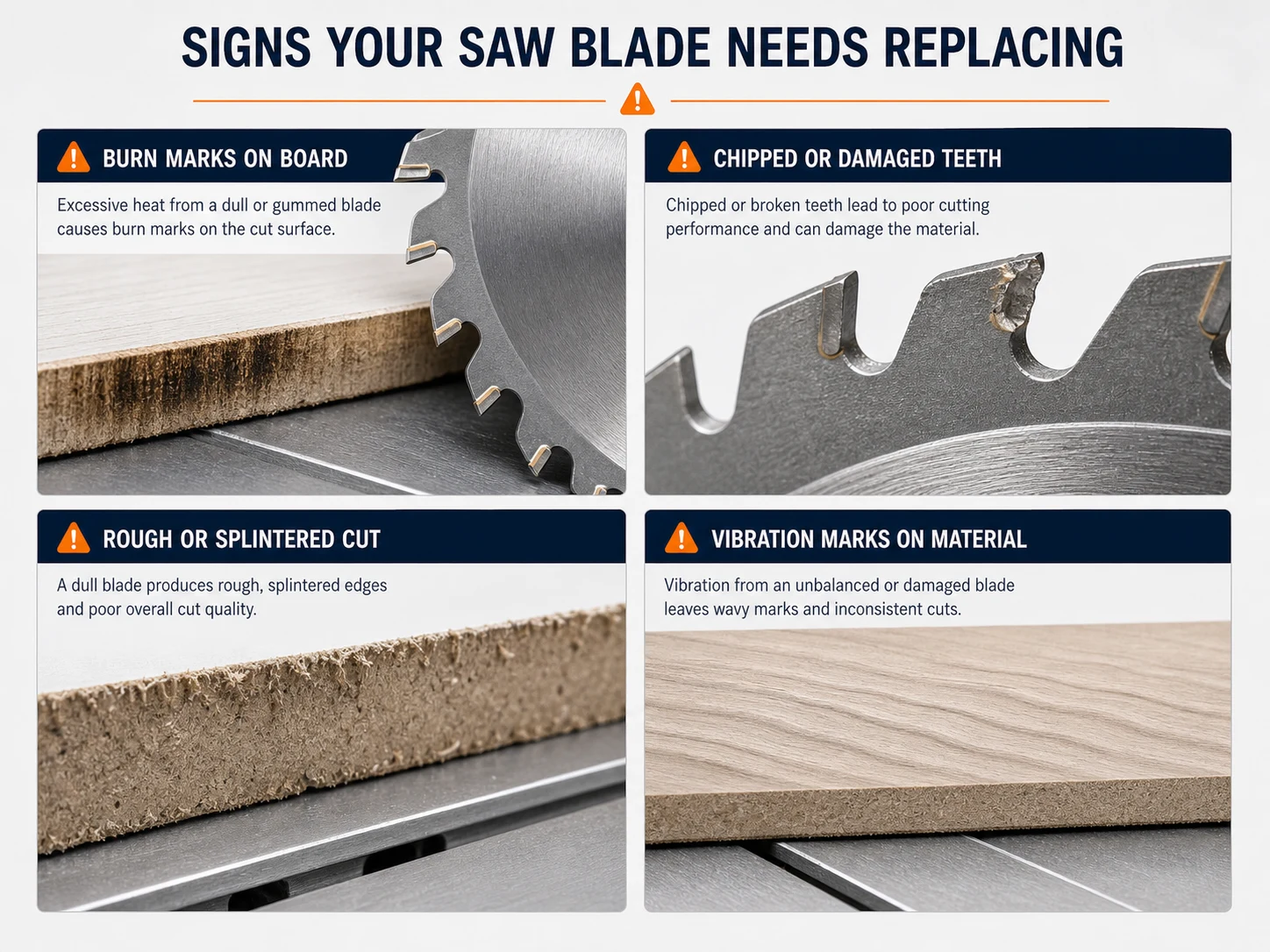
Sign #1: Burn Marks on Cut Surface
If you’re seeing dark scorch marks on your cut edges, your blade is telling you it’s struggling. Burn marks occur when the blade can’t cut efficiently — instead of slicing through the material, it rubs against it, generating excessive friction and heat.
What’s happening:
- The carbide tips have dulled to the point where they’re pressing rather than cutting
- The blade is spinning against the material without removing enough material per tooth
- The heat from friction chars the wood fibers or melts the resin in MDF and particle board
Burn marks are especially common in hardwood and MDF. If you notice them appearing consistently on cuts that used to be clean, it’s time to inspect the blade. A blade that’s only slightly dull can sometimes be resharpened — but if you keep running it, the tips will overheat and the carbide can crack, making resharpening impossible.
Quick test: Run your finger along the cut edge. If it feels hot to the touch within seconds of the cut, your blade is generating too much friction — a clear sign it’s past its prime.
Sign #2: Increased Vibration
A blade that used to run smoothly and starts vibrating is sending a strong signal. Vibration in a previously stable setup usually means:
- Tooth damage: One or more carbide tips are chipped or missing. This creates an imbalance — the blade is essentially “skipping” at those teeth positions, causing the entire assembly to wobble.
- Uneven wear: If some teeth have worn more than others, the blade cuts unevenly per revolution, producing vibration that increases with RPM.
- Loss of tension: Saw blades are deliberately tensioned (stretched) during manufacturing to run true at their intended RPM. Over time and with heat cycling, this tension can relax, causing the blade to wobble.
Vibration isn’t just annoying — it degrades cut quality, accelerates machine bearing wear, and can be dangerous. If a blade starts vibrating noticeably, stop using it immediately and inspect every tooth.
Sign #3: Slower Cutting Speed / Motor Strain
When your saw’s motor starts sounding like it’s working harder to make the same cuts, the blade is the most likely culprit. A sharp blade slices through material with minimal resistance. A dull blade forces each tooth to push and scrape rather than cut — dramatically increasing the cutting force required.
What to watch for:
- You find yourself pushing the workpiece harder through the blade
- The motor sounds like it’s laboring — a deeper, strained tone instead of the usual steady hum
- Cuts that used to take one smooth pass now require slower feed or even two passes
- The circuit breaker trips more frequently on your saw’s electrical supply
In production environments, this is particularly costly. A blade that cuts 15% slower across a shift adds up to significant lost production time over weeks and months. Replacing the blade earlier — or resharpening before it gets to this point — is always cheaper than the lost productivity.
Sign #4: Chipping on Edges
Edge chipping — where the cut surface shows torn or broken fibers instead of a clean edge — is one of the most visible signs that your blade is past its best. It’s also the most costly sign for furniture manufacturers and anyone cutting finished panels.
Chipping happens when the blade’s cutting edges are no longer sharp enough to cleanly sever the material fibers. Instead of slicing cleanly, each tooth tears and breaks the fibers, leaving a ragged edge. On laminated and melamine panels, this shows up as chipping on the bottom surface (where the teeth exit the material).
What to check:
- If the chipping is on both top and bottom surfaces — the blade is likely dull and needs resharpening or replacement
- If chipping is only on the bottom surface — it might be a tooth geometry issue (ATB blades chip melamine more than TCG), or the blade is starting to dull
- If chipping appeared suddenly — check for a damaged or missing tooth, which would cause irregular cuts
On our TCT saw blades, the transition from “cutting clean” to “starting to chip” usually happens gradually. Experienced operators catch it early and get the blade resharpened. Waiting until the chipping is obvious means the carbide tips have worn past the point where resharpening is cost-effective.
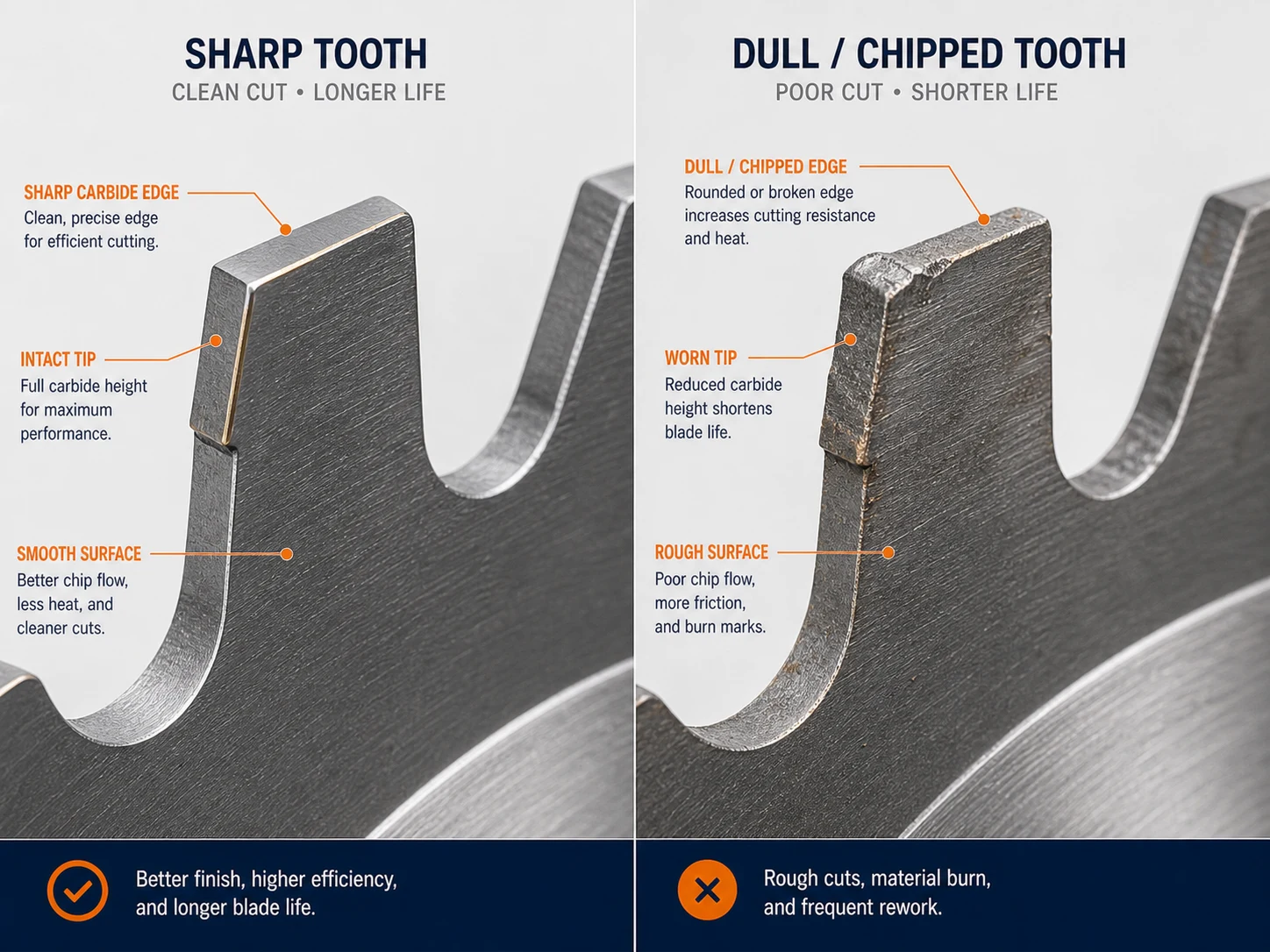
Sign #5: Visible Tooth Damage
This is the most obvious sign — but surprisingly, many operators miss it because they don’t inspect their blades regularly. Visible tooth damage includes:
- Chipped or broken carbide tips: Look for missing chunks on the cutting edge. Even a tiny chip degrades cut quality and creates imbalance.
- Missing teeth: If a carbide tip has detached entirely from the steel body, the blade is unsafe to use. Stop immediately.
- Cracked plate body: Look for cracks radiating from the gullet (the space between teeth) or from the bore hole. A cracked blade can shatter at speed — this is a critical safety hazard.
- Discolored tips: Blue or black discoloration on carbide tips indicates severe overheating. The tip may have lost its hardness and will fail quickly even if it looks intact.
Inspection tip: After every blade change or every 8 hours of operation, take 30 seconds to visually inspect the teeth under good lighting. Catching a chipped tip early prevents it from becoming a missing tooth — and a missing tooth can damage adjacent teeth and create dangerous vibration.
Bonus: How to Extend Your Blade’s Lifespan
Replacing blades less frequently saves money and reduces downtime. Here are the practices that make the biggest difference, based on what our most cost-conscious customers do:
- Clean your blade after every shift. Resin and pitch buildup increases friction and heat, accelerating tip wear. A brass brush and blade cleaning solution take 5 minutes and can extend blade life by 30–50%.
- Use the right blade for the material. Don’t use a wood-cutting blade on MDF, or a general-purpose blade on melamine. Each material needs the right tooth configuration. Dedicated blades last longer than compromises.
- Resharpen before the blade is obviously dull. The best time to resharpen is when you first notice a slight decline in cut quality — not when the blade is burning cuts and chipping edges. Early resharpening removes less carbide and gives you more resharpening cycles.
- Use blade stiffeners. Flange collars reduce vibration and flex, especially important for thin-kerf blades and large diameters.
- Match feed rate to the blade. Too slow burns the tips; too fast overloads them. Let the blade cut at its natural rate.
When to Resharpen vs. Replace
This is a common question. Here’s our guidance from the factory:
| Condition | Resharpen | Replace |
|---|---|---|
| Tips are dull but intact (no chips, cracks) | Yes | No |
| Minor chipping on 1–2 tips | Yes (if blade has been sharpened <3 times) | Consider replacement |
| Multiple tips chipped or missing | No | Yes — not cost-effective to repair |
| Plate body cracked or warped | No | Yes — safety hazard |
| Already resharpened 4–5 times | No | Yes — carbide too thin to sharpen further |
| Bore hole worn or damaged | Maybe (if re-borable) | Usually yes |
As a rule: a blade in good condition can be resharpened 3–5 times before the carbide tips are too thin to hold an edge. Each resharpening typically costs 15–25% of a new blade. If you’re resharpening more than 3 times, you’re probably running the blade too long between sharpenings — which reduces the number of possible cycles.
Need New Saw Blades?
If your blades are showing any of the five signs above, it’s time for a replacement — or at least a professional resharpening. At our Hangzhou factory, we manufacture TCT saw blades across the full range of diameters (110mm–500mm), tooth configurations, and quality grades. We also offer custom specifications with MOQ from 100 pieces.
Browse our product catalog for standard sizes, or contact our factory team for a custom quotation. We respond within 24 hours.
Get full specifications, quality grades, and OEM options.
Download PDF Catalog
Before operation or servicing: review our circular saw blade safety guide and pre-use checklist for compatibility, maximum RPM, guarding and machine-specific maintenance precautions.